Procurement software for SMEs: how to choose
Discover how to choose the right SME procurement management software. Compare key features, selection criteria, and deployment best practices.
Article summary
- A procurement management software for SMEs centralizes purchase requests, supplier orders, approval circuits, and budget monitoring in a single tool.
- It replaces Excel files, scattered emails, and manual processes that generate errors, duplicates, and loss of visibility on expenses.
- SMEs that digitize their purchases reduce average order processing time by 30% and improve real-time budget visibility.
- Key selection criteria: ERP/CRM integration, customizable approval workflows, supplier management, dashboards, and electronic invoicing compliance.
- Successful deployment involves auditing existing flows, piloting on a restricted scope, and then progressive expansion.

Procurement management software for SMEs is a digital tool that enables the management of the entire procurement cycle, from the purchase request issued by an employee to the receipt of goods and payment to the supplier. It centralizes information (suppliers, prices, contracts, history), automates validation circuits, and offers real-time visibility into committed expenses.
For an SME, procurement management often remains artisanal: requests by email, purchase orders on Excel, invoices classified in shared folders, no consolidated monitoring of expenses by supplier or category. This way of operating generates input errors, duplicate orders, payment delays, and an inability to negotiate effectively with suppliers due to a lack of reliable data.
Procurement software adapted to SMEs solves these problems by structuring the process without imposing the complexity of a large-account ERP. For SMEs that also sell in B2B, the digitalization of purchases naturally combines with the digitalization of sales via a B2B e-commerce platform.
What is procurement management software for SMEs?
Procurement management software (also called procurement software, e-procurement software, or procure-to-pay solution) is a SaaS or on-premise application that covers all or part of the purchasing cycle: expression of need, supplier consultation, negotiation, ordering, receipt, invoice control, and payment. For an SME, the challenge is not to implement a tool as comprehensive as Ivalua or SAP Ariba (designed for large accounts), but to find a proportional solution that brings structure without weighing down operations.
The classic pitfall: choosing a tool that is too complex and requires a full-time administrator, or, conversely, settling for an improved spreadsheet that does not solve any underlying problem. The right approach is to identify the 3 to 5 priority pain points (order validation too slow, no visibility on expenses, lost invoices, unmonitored supplier relationship) and select software that addresses them concretely.
Mini-framework: SME Purchasing Maturity Matrix
SMEs that sell and buy in B2B have an advantage in unifying the management of their flows on a single B2B platform unique, which covers both the product catalog, customer orders, and supplier supplies.
7 indispensable features of SME purchasing software
The market offers dozens of purchasing software solutions, from the simplest to the most comprehensive. For an SME, 7 features make the difference between a tool that will be adopted by the teams and one that will end up abandoned after 3 months.
Purchase requests and approval workflows
This is the foundation of any purchasing software. Every employee must be able to submit a purchase request from a simple interface (web or mobile), with the possibility of attaching a quote or a purchase order. The request then follows a configurable approval circuit: validation by the manager, then by the purchasing manager if the amount exceeds a defined threshold.
Concrete example: an industrial SME of 80 employees sets up 3 levels of validation (< €500: direct manager; €500-€5,000: purchasing manager; > €5,000: general management). The circuit takes less than 24 hours instead of 3 to 5 days in email mode.
Supplier and contract management
A centralized supplier directory with detailed files (contact information, pricing conditions, delivery times, order history, quality rating) replaces the Excel address book. Framework contract management ensures that orders comply with negotiated prices.
The pitfall to avoid: importing all suppliers at once without qualifying them. It is better to start with the 20 suppliers who represent 80% of the purchasing volume, then gradually expand.
Other key features to check when choosing:
- Automated purchase orders: one-click generation from the validated purchase request, with automatic retrieval of supplier references, prices, and conditions.
- Receipt tracking: reconciliation between the order, the delivery note, and the invoice (three-way matching) to detect discrepancies before payment.
- Dashboards and analytics: expenses by supplier, by category, by period. Key KPIs: average processing time, compliance rate, savings realized.
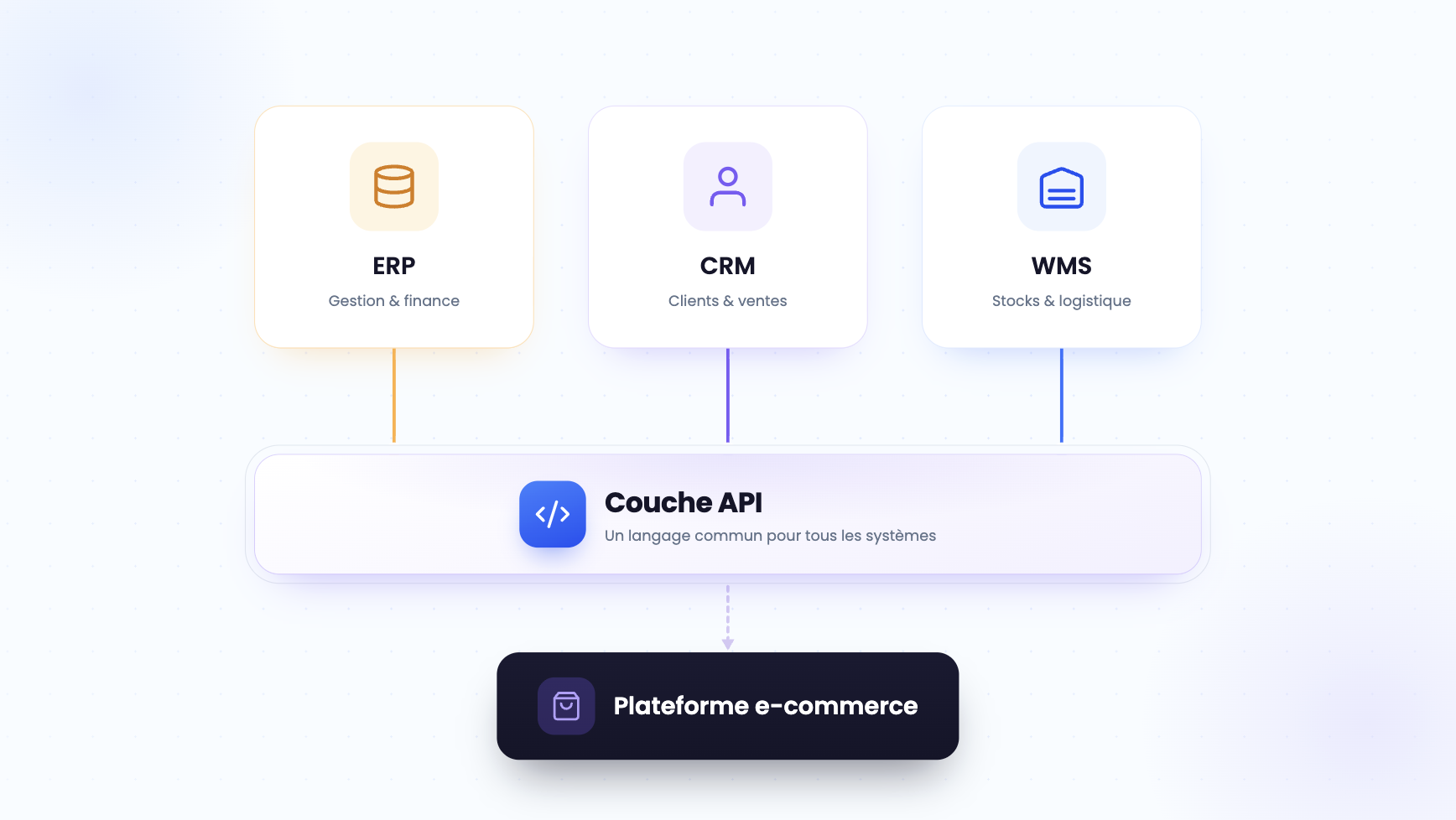
- Accounting and ERP integration: native connection with accounting software (Sage, Cegid, Pennylane) and ERPs to avoid re-entry.
- Electronic invoicing compliance: support for mandatory formats in France (Factur-X, UBL) in anticipation of the 2026 obligation.
5 criteria for choosing the right purchasing software for SMEs
All solutions on the market promise to "digitize purchases." In practice, SMEs that succeed in their project select their tool based on 5 concrete criteria, weighted according to their context.
Selection Scorecard: to be completed for each software evaluated
The most often underestimated criterion is integration. Purchasing software that does not communicate with the existing CRM or ERP forces teams to re-enter data, which negates some of the productivity gains. For B2B SMEs, the connection between the purchasing software and the sales platform is particularly important: when a customer orders, the system must be able to automatically trigger a supplier replenishment if the stock is insufficient.
It is precisely this type of automation that a centralized order management system allows: customer orders and supplier supplies are managed from a single interface.
Another decisive criterion for B2B SMEs: the software's ability to manage automated quotes with the retrieval of negotiated pricing conditions, without manual re-entry.
How to deploy purchasing software in an SME: 4-step method
The deployment of purchasing software in an SME rarely fails for technical reasons. The causes of failure are almost always organizational: too broad a scope, lack of management sponsor, resistance to change from users. Here is the 4-step method to avoid these pitfalls.
Step 1: audit existing purchasing flows
Before setting up a tool, you need to understand how purchases actually work in the company, not how they should work. Gather the 3 to 5 key people in the process (director, purchasing manager, accountant, a field user) for a 2-hour workshop. Objective: map the current end-to-end flow (who requests what, who validates, how the order is placed, how the invoice is processed) and identify the 3 major friction points.
A classic example: in many SMEs, it is the accountant who discovers the purchases at the time of the invoice, without prior visibility.
Step 2: choose and configure the tool
Use the scorecard above to evaluate 3 to 5 solutions. Request a demonstration with your own data (not a fictitious dataset) and test the use cases identified during the audit. Priority configuration: approval workflows, files of the 20 main suppliers, and accounting integration. The rest (advanced analytics, supplier portal, contract management) are configured in a second phase.
Step 3: launch a pilot.
Deploy the tool on a restricted scope (a department or a category of purchases) for 4 to 6 weeks. Measure 3 KPIs: the average validation time for a purchase request, the number of input errors, and the adoption rate (percentage of requests placed via the tool vs. by email). If the adoption rate is below 70% at the end of the pilot, identify the obstacles (ergonomics, training, resistance) before expanding.
Step 4: generalize and iterate.
Once the pilot is validated, extend the tool to all departments. Plan a 45-minute training session per user profile (requester, approver, purchasing manager) with practical cases drawn from their daily life. Schedule a monthly review of KPIs for the first 6 months to adjust workflows and approval thresholds.
Template: SME purchasing software deployment plan
3 frequent errors that sabotage a digitized purchasing project
The digitalization of purchases is a high-ROI project for SMEs, provided that three recurring errors are avoided that transform a profitable investment into a source of frustration.
- 1. Wanting to digitize everything at once. An SME with 50 employees that attempts to simultaneously implement purchase request management, the supplier portal, advanced analytics, and invoice dematerialization ends up with a 6-month project instead of 6 weeks.
The method that works: start with the purchase request workflow and approval, stabilize this foundation for 2 months, then add an additional brick every 2 months. Each phase must demonstrate a measurable gain before moving on to the next.
- 2. Ignoring resistance to change. Teams accustomed to placing their orders by email or phone will not spontaneously switch to a new tool. Without a visible sponsor from management and without on-site support, the adoption rate stagnates below 50%.
Concrete action: identify 2 to 3 "ambassador" users in each department, train them first, and ask them to relay best practices to their colleagues. The adoption rate exceeds 80% with this approach.
- 3. Neglecting integration with existing tools. Purchasing software disconnected from the rest of the information system creates permanent double entry. Salespeople enter customer orders into the CRM, the accountant re-enters supplier invoices into the purchasing software, and no one has a consolidated view.
The prerequisite before any deployment: check that the software offers native connectors (API or plug-in) to the 2 or 3 critical tools of the company (accounting, CRM, ERP).
These three pitfalls share a common cause: treating purchasing software as an isolated IT project, while it is part of a broader dynamic of commercial flow digitalization. An SME that sells in B2B and digitizes its purchases without connecting this component to its sales channels loses some of the benefit. This is why the most advanced companies are gradually unifying purchases and sales on a marketplace B2B that centralizes exchanges with all of their commercial partners.
This convergence also opens the way for additional gains. When the purchasing software feeds the same data as the sales system, it becomes possible to predict replenishment needs based on customer order history, a key lever for AI in supply chain applied to SMEs. Similarly, aligning supplies with the real demand of the B2B sales process reduces overstocks and shortages, two items that directly weigh on the margin.
SMEs that push this logic to the end combine the digitalization of purchases with sales optimization using AI to automate low-value tasks on both sides of the chain. They rely on the latest tendencies of e-commerce B2B to offer a unified experience to their customers and suppliers, while working on l'optimisation des coûts logistiques B2B as a complementary lever for profitability. For those who manage a significant volume of orders, the logiciel de gestion de commande B2B naturally complements the purchasing software by orchestrating the rest of the flow, from preparation to shipping.
FAQ
What is procurement management software for SMEs?
It is a digital tool that centralizes purchase requests, validation circuits, supplier orders, and budget monitoring in a single interface. It replaces manual processes (emails, Excel files) to reduce errors, speed up approvals, and offer real-time visibility into the company's expenses.

What budget should be planned for purchasing software in an SME?
SaaS solutions adapted to SMEs cost between €50 and €300 per month depending on the number of users and the features included. The cost of initial integration (configuration, ERP/accounting connection) must be added, which generally represents between €2,000 and €10,000. ROI is visible from the first 3 to 6 months thanks to time savings and error reduction.
Can an ERP be used as purchasing software for an SME?
Yes, modular ERPs like Sage 100, Odoo, or Cegid include a purchasing module. The advantage is native integration with accounting and stocks. The disadvantage is that the purchasing module is sometimes less ergonomic and less specialized than a dedicated solution. For an SME that already has an ERP, activating the purchasing module is often the first step before considering a complementary tool.
How to convince management to invest in purchasing software?
Quantify the time lost on manual tasks: number of hours per week dedicated to order entry, supplier follow-ups, and invoice reconciliation. Multiply by the average hourly cost. For an SME with 50 employees, the waste often amounts to between €20,000 and €40,000 per year. In comparison, the cost of a SaaS software remains below €5,000/year.
What are the best purchasing management software solutions for SMEs in 2026?
Among the most widely used solutions are Weproc and Precoro for SMEs looking for a dedicated e-procurement platform, Sage 100 and Odoo for companies that prefer purchasing features integrated into their ERP, and Axonaut for VSEs and SMEs seeking a lightweight solution combining CRM and purchasing. The right choice depends on the company's size, budget, integration requirements, and procurement maturity. Companies sourcing from suppliers with digital catalogs may also benefit from platforms such as Djust, which enable catalog integration with procurement systems through PunchOut and other B2B commerce integrations.


.png)