ERP integration: key issues for B2B distributors and wholesalers
Learn how to successfully integrate your ERP. Explore the key challenges, systems to connect, and best practices for B2B distributors and wholesalers.
Article summary
- ERP integration connects your back-office to your sales ecosystem (e-commerce, CRM, WMS, PIM…) in order to automatically synchronize key data: inventory, prices, customers, and orders.
- Successful integration improves data reliability, productivity, customer experience, and scalability, while eliminating manual entry and errors that hinder growth.
- For multichannel B2B commerce, prioritize an API-first architecture with native connectors, which is more flexible and scalable than point-to-point integrations.
- Project success depends as much on the method as on the technology: data quality, defining a master system, supporting teams, and progressive deployment are the keys to sustainable integration.
.png)
ERP integration consists of connecting your Enterprise Resource Planning (ERP) software to the company's other systems so that data flows automatically, in real-time, and without manual entry. For a distributor or wholesaler, the ERP manages inventory, pricing, and invoicing, but it was never designed for online selling or orchestrating multiple channels. The challenge is not just technical: it involves linking this back-office foundation to your sales ecosystem (e-commerce, marketplace, sales force, CRM) to make every order and price reliable. This article reviews the key issues of ERP integration for distribution, the systems to connect first, available methods, a grid for successful deployment, and the costliest pitfalls.
ERP integration: what does it mean for a distributor?
An ERP centralizes a distributor's internal operations: purchasing, inventory management, accounting, invoicing, and logistics. It is the company's back-office foundation. The problem is simple: this tool was designed to manage, not to sell on modern channels. ERP integration therefore consists of connecting this core to your sales ecosystem so that data flows without manual entry.
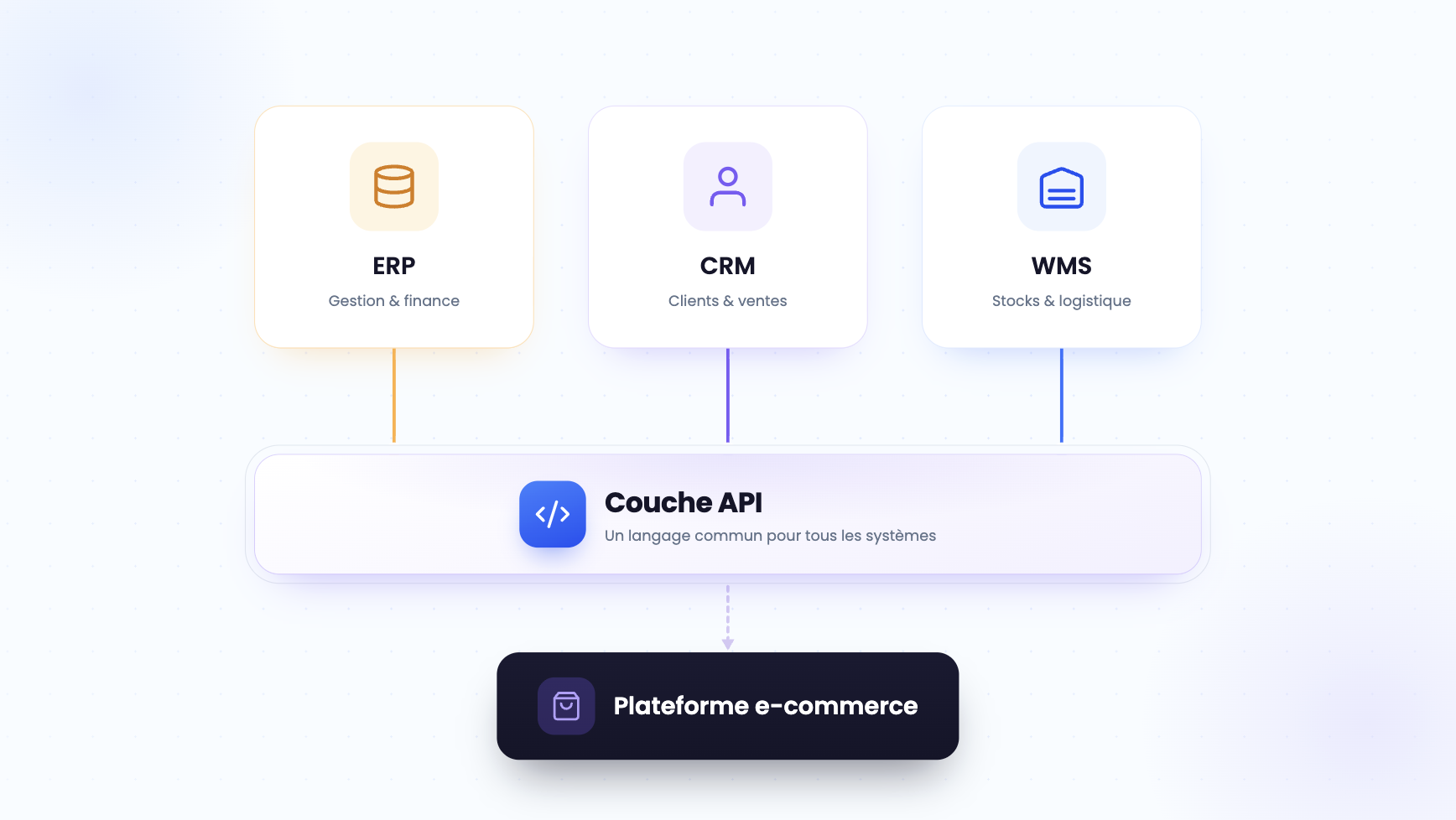
Concretely, a synchronization layer shares key master data (products, prices, customers, inventory) between the ERP and sales channels. A price change entered in the ERP must be instantly reflected on your sales site and the sales force application. Modern B2B site software retrieves this data continuously, without manual entry. Without this link, teams re-enter orders received by email or fax, which multiplies errors, stockouts, and disputes. It remains possible to modernize your B2B commerce from an existing ERP, without starting from scratch.
Remember: The classic trap is wanting the ERP to do everything, at the cost of unmanageable custom developments. Connecting specialized tools around a common repository preserves interoperability and scalability.
4 key issues of ERP integration for wholesalers
For a wholesaler, ERP integration is not an IT subject: it is a lever for margin and growth. Four issues structure the approach and determine the return on investment.
Framework: the 4 issues of successful erp integration
Issue 1 · Data Reliability: Exact inventory, pricing, and availability on all channels, ending stockouts and billing disputes.
Issue 2 · Productivity: Elimination of manual entry; sales and admin teams sell instead of re-entering orders.
Issue 3 · Omnichannel Customer Experience: Autonomous self-service buyers with the same prices and inventory on the web, app, and in the field.
Issue 4 · Scalability: Add a channel, warehouse, or country without redesigning the information system.
These issues have a cost when ignored. According to IDC, companies lose 20 to 30% of their annual revenue due to disconnected data silos. MuleSoft's Connectivity Benchmark report estimates the average number of applications per company at nearly 900, with less than a third actually integrated. The typical case: a trader who manages five separate systems, where a simple price change must be replicated in three environments. A missed update, and the merchandise goes out at the wrong price.
The solution is to automate order processing and synchronize repositories, rather than piling up manual tasks. The trap would be to fix the storefront first: a high-performing B2B sales process relies first on reliable data, not on graphic design.
Which systems should you connect to your ERP?
Once the ERP is established as the central repository, the question becomes: which systems should you connect first? For distribution, five building blocks consistently appear, each exchanging a specific type of data with the ERP.
CRM and ERP: the customer relationship duo
The CRM manages the customer relationship and sales pipeline, while the ERP holds orders, billing, and outstanding balances. Connecting them gives sales teams a real-time view of creditworthiness and purchase history. Concrete example: a salesperson sees that a customer has a 60-day outstanding balance before validating a new order. The method: map common fields (SIRET, pricing terms, outstanding balances), designate the master system for each data point, then automate synchronization. This CRM-ERP integration avoids duplicates and blind decisions.
E-commerce, WMS, and PIM: selling and delivering without errors
This trio covers sales and execution. The PIM feeds product sheets, the B2B eCommerce channel sells, the WMS prepares and ships. Inventory must be shared by all, from a single source. Example: the availability displayed online corresponds to the actual inventory in the warehouse, which prevents overselling and cancellations. The mini-method: define a single inventory source, set a synchronization frequency adapted to order volume, then test boundary cases (stockout, restocking, return). A microservices architecture facilitates these exchanges via a universal connector, in a modular architecture logic.
Which ERP integration method to choose?
Not all integrations are equal. Four main methods coexist, from artisanal tinkering to the industrial approach, and the right choice depends on the maturity of your information system.
For multichannel B2B commerce, the API-first approach and the native connector are essential: they allow real-time synchronization, clean decoupling between back-office and front-office, and controlled scaling. This is the logic of headless e-commerce, where the sales platform communicates with the ERP via API without depending on its interface. Commerce cloud further pushes this flexibility. The trap would be to select point-to-point connections for a system destined to grow: the architecture quickly turns into a spaghetti mess impossible to maintain.
Successfully executing your ERP integration project
A successful ERP integration project relies more on the method than the technology. The framework is constant: define the scope, map data flows, designate the master system for each repository, define synchronization rules, test, and then support the teams. This self-assessment grid situates your level of maturity.
Reading: A score below 5 suggests consolidating the foundations before industrializing; a score greater than or equal to 8 signals a base ready to connect new channels.
Regarding timelines, a B2B e-commerce project connected to the ERP is generally deployed in 4 to 6 months, and a turnkey platform for SMEs in a few weeks, according to DJUST, which claims an adoption rate of over 70 % in three months. Feedback from distributors confirms that value is then measured on concrete indicators, such as average transaction value or order volume. Also consider connecting B2B payments to make collection reliable. Before choosing your B2B e-commerce platform, therefore, evaluate both the maturity of your teams and the technical capabilities of the tool.
3 pitfalls to avoid during ERP integration
ERP integration rarely fails for technical reasons. According to several sector studies, 50 to 75% of ERP projects do not fully achieve their objectives. Three pitfalls recur, each with a concrete countermeasure.
Framework: the 3 pitfalls and their countermeasures
Pitfall 1 · Make the ERP carry everything: Over-personalization makes the system rigid and expensive. Countermeasure: connect best-of-breed tools via API.
Pitfall 2 · Neglecting data quality: Duplicates and inconsistent formats distort synchronization. Countermeasure: clean and define a master repository before connecting.
Pitfall 3 · Forgetting change management: A project that is technically successful but rejected by teams. Countermeasure: train, designate leads, measure adoption.
Example not to follow: a wholesaler launching their portal on erroneous inventory data reaps cancellations and a lasting loss of trust. Data discipline and change management often weigh heavier than the choice of tool. A progressive approach, supported by a proven component like replenishment software and its API connector, secures each step. This logic joins that of commerce composable, which assembles best-of-breed components around the ERP.
DJUST, the B2B commerce platform that connects to your ERP
DJUST applies the principles described in this article to its platform. Designed as a headless and modular solution, it connects to any ERP thanks to an API connector and its DataHub module, with native connectors for the main systems on the market (SAP, Sage, Cegid, Dynamics) and an open API for custom tools. Your inventory, pricing, and order data synchronize automatically, in real-time, without manual entry between the ERP, CRM, WMS, and your sales channels. A project is generally deployed in 4 to 6 months, or in a few weeks for a turnkey platform, with an adoption rate of over 70 % in three months.
FAQ
What is the difference between an ERP and a CRM?
The ERP pilots internal operations: inventory, purchasing, accounting, invoicing, and logistics. The CRM manages the customer relationship and sales pipeline. Both are complementary: connecting the CRM and the ERP gives teams a unified view of orders, outstanding balances, and customer history, essential for selling effectively in B2B.

How long does ERP integration take?
The timeline depends on the scope. A B2B e-commerce project connected to the ERP is generally deployed in 4 to 6 months, and a turnkey platform for SMEs in a few weeks, according to DJUST. A full ERP project in an SME usually takes 3 to 9 months. Mapping flows upstream significantly reduces this delay.
Is an ERP enough to sell B2B online?
No. The ERP manages the back-office but offers no purchasing portal, no personalized catalog, nor a self-service ordering path. A B2B commerce platform connected to the ERP is needed to sell online, with contractual prices per customer and inventory displayed in real-time.
Which systems should be connected to your ERP first?
Start with the systems that directly touch sales: the B2B e-commerce channel and the WMS for inventory, then the CRM for customer relationship and the PIM for product sheets. Prioritize according to the most manual and error-prone flows, as these cost the most.
Is ERP integration risky for an SME?
The risk exists: 50 to 75% of ERP projects do not fully achieve their objectives. It is significantly reduced with a clear method: map flows, designate a master system, synchronize in real-time via API, and support teams. A progressive scope secures deployment and accelerates adoption.


.png)