Connect Sage X3 to DJUST Sales to automate B2B orders
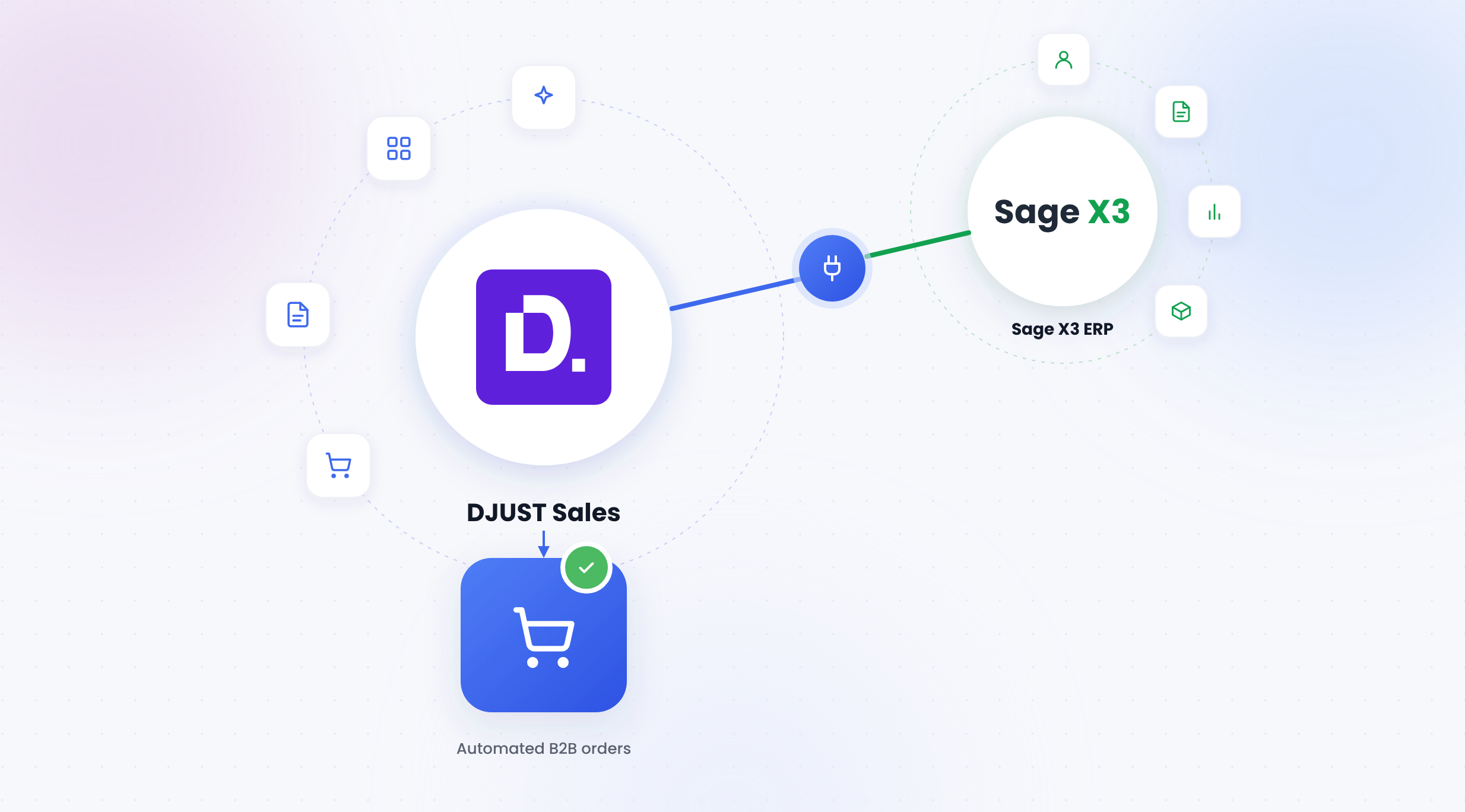
In many mid-sized companies, Sage X3 manages production, inventory, and invoicing. Yet, customer orders still arrive via PDF, Excel, or email, and sales administration teams have to re-enter them line by line into the ERP. The native DJUST Sales connector for Sage X3 eliminates this step: it synchronizes the catalog, pricing, and inventory from Sage X3, reads orders in any format, and creates the sales order directly in the ERP, which remains the single source of truth.
Article summary
- Sage X3 remains the reference for the catalog, negotiated pricing, inventory, and customer accounts.
- The connector is configured via the DJUST Sales Data Hub, with no scripts or custom development required.
- The DJUST Sales AI extracts order lines received via PDF, Excel, image, or email and matches them against the Sage X3 catalog.
- Once the order is validated, the sales order is created in Sage X3 with a single click.
Why has connecting ERPs to sales tools become a critical issue for mid-sized companies?
In industrial or trading mid-sized companies, the ERP centralizes essential data: items, customer-negotiated pricing, site-specific inventory, and delivery terms. However, sales and administration teams also work within a CRM, spreadsheets, and their email inboxes. Each tool maintains its own copy of the data, leading to discrepancies.
The symptoms are well-known:
- a price applied to an order that no longer matches the negotiated price list;
- a customer reference that does not correspond to any item in the ERP;
- inventory promised to a customer that is no longer available;
- duplicate customer accounts between the CRM and the ERP.
Why is integration more sensitive with an ERP like Sage X3?
Sage X3 is often deployed with an integrator, custom-configured, and sometimes hosted on-premises. For a long time, every new tool connected to it meant an integration project: custom development, delays, and maintenance costs with every version upgrade. Consequently, many sales administration teams continue to re-enter orders manually due to the lack of a simple connection.
What is Sage X3?
Sage X3 is Sage's ERP designed for mid-sized companies and large SMEs. It originated from Adonix X3, a French software publisher acquired by Sage in 2005, and was known for a time as Sage Enterprise Management.
It covers finance, purchasing, sales, inventory, and production, with native support for multi-company, multi-site, and multi-currency management. It is primarily found in distribution, trading, manufacturing, and the food industry.
These are precisely the sectors where B2B orders are high-volume, recurring, and often received in heterogeneous formats. A connector must therefore respect the specific configuration of each Sage X3 deployment: sites, pricing, sales units, and item references.
What is an AI sales copilot like DJUST Sales?
DJUST Sales does not replace Sage X3 or your CRM. It works alongside them to handle repetitive sales administration tasks: reading incoming orders, finding the right items in the catalog, verifying prices, and creating the sales order.
Your team stays in control of every order. They validate what the AI has prepared instead of re-entering everything, allowing them to focus on customers rather than data entry.
What is the native Sage X3 x DJUST Sales connector?
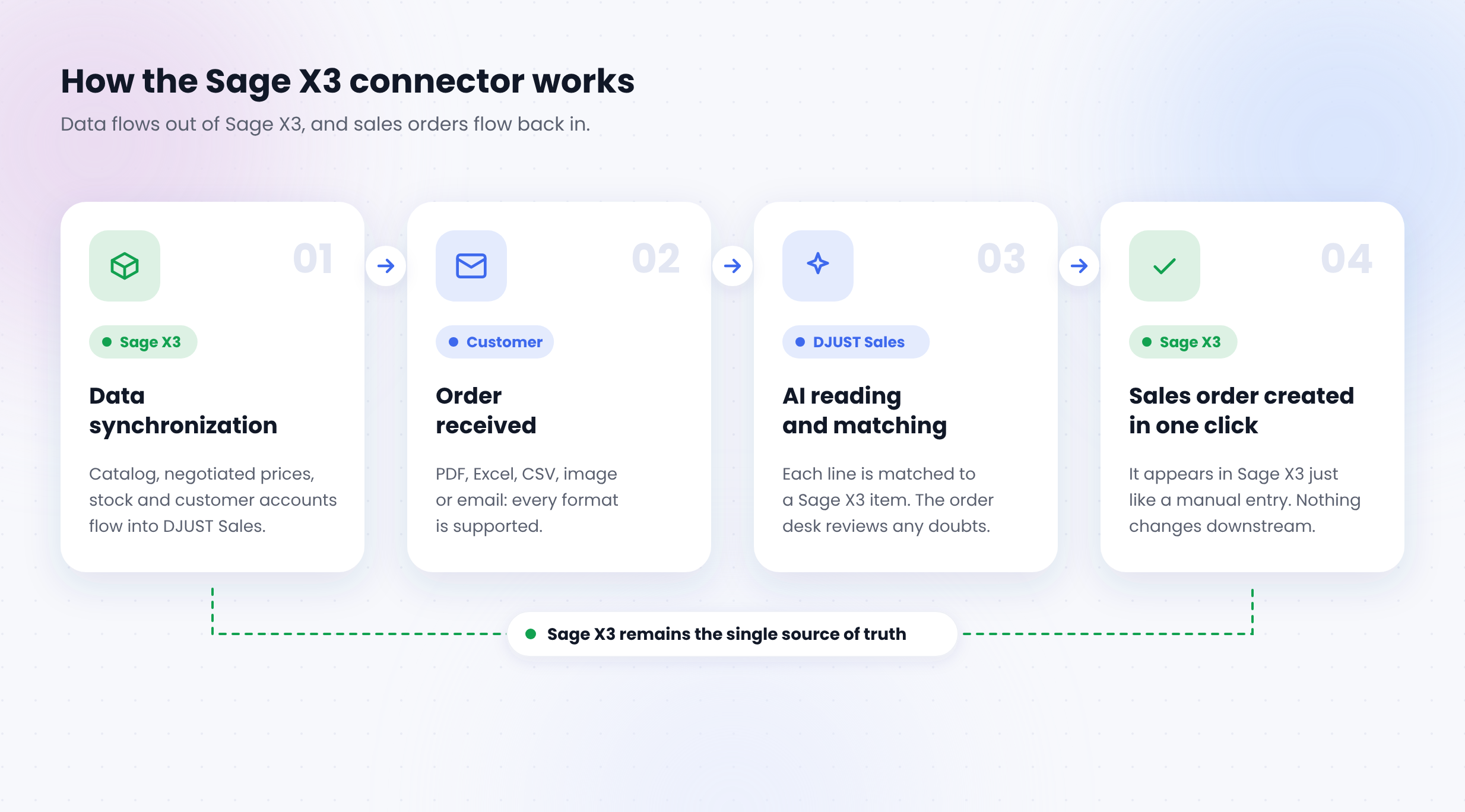
How does the connector sync the catalog, prices and stock?
Three data flows run from Sage X3 to DJUST Sales:
- catalog: items, references and descriptions;
- prices: standard price lists and customer-specific pricing;
- stock: available quantities.
Each flow can be enabled separately, scheduled or run manually, and every sync is tracked in the Data Hub. No more Excel exports from the ERP to keep sales tools up to date.
How does DJUST Sales retrieve accounts and contacts?
Customer accounts, contacts and pricing terms already in Sage X3 are available in DJUST Sales without re-importing anything. The order desk doesn't have to recreate customers, and there is no double entry.
How does it handle an order received as a PDF, spreadsheet, image or email?
DJUST Sales AI reads the incoming document and extracts the key information: customer, PO number, terms, requested delivery date and order lines. It then matches each line to an item in the Sage X3 catalog, even when the customer uses its own part numbers.
A confidence indicator flags the lines that need checking. The order desk only reviews uncertain matches instead of checking every line.
What happens once the order is approved?
In one click, the sales order is created in Sage X3. It appears just like a manually entered order, so downstream processes (picking, delivery, invoicing) stay exactly the same.
What results can you expect?
Teams that have automated order entry with DJUST Sales report:
With an ERP like Sage X3, the savings also come from the project itself: no custom development to fund or maintain at every upgrade.
Is the DJUST Sales Sage X3 connector right for your business?
It probably is if:
- your company runs on Sage X3;
- your customer orders arrive by PDF, spreadsheet, image or email rather than through a portal or EDI;
- your order desk spends a large share of its time re-keying orders into the ERP;
- you want to connect a new tool to Sage X3 without launching a custom integration project;
- you are looking for an AI copilot to refocus your teams on customer relationships.
FAQ
Does DJUST Sales replace Sage X3?
No. DJUST Sales does not replace Sage X3; it connects to it. Sage X3 remains the core ERP for your catalog, pricing, inventory, customer accounts, and invoicing. DJUST Sales handles only the order entry process: reading incoming documents, matching them against your catalog, and creating the sales order directly in Sage X3.

Does DJUST Sales work with ERPs other than Sage X3?
Yes. DJUST Sales works with all ERPs. It offers native connectors for Sage X3 and Odoo, which can be configured in just a few clicks via the Data Hub. For other ERPs (SAP, Microsoft Dynamics, Cegid, Divalto, etc.), the connection is handled via the SFTP connector, which exchanges catalogs, pricing, inventory, and orders with any system.
Does the order created by DJUST Sales appear normally in Sage X3?
Yes. Sales orders created by DJUST Sales appear in Sage X3 just like manually entered orders. Downstream processes (picking, shipping, invoicing) remain unchanged, and your logistics and accounting teams do not need to alter their workflows.
How can you automate customer order entry in Sage X3?
The native DJUST Sales connector for Sage X3 automates B2B order entry. DJUST Sales’ AI reads orders received via PDF, Excel, CSV, image, or email. It extracts the customer, line items, quantities, and delivery date, then matches each line to an item in the Sage X3 catalog. Once validated by the sales administration team, the purchase order is created in Sage X3 with a single click, eliminating manual data entry.
How often is Sage X3 data synchronized?
The team chooses the frequency for each feed: catalogs, pricing, and inventory can each have their own schedule. Synchronization can also be triggered manually at any time from the Data Hub, where every execution is tracked.
Is custom development or working through our Sage X3 integrator required?
No. The Sage X3 connector is configured directly from the DJUST Sales Data Hub in just a few clicks, with no scripts or custom development required. Your teams won't need to launch an integration project with your integrator or maintain code every time you upgrade Sage X3.
Is data duplicated between Sage X3 and DJUST Sales?
No. Sage X3 remains the single source of truth. DJUST Sales relies on data synchronized from the ERP rather than maintaining its own version. When a price or stock level changes in Sage X3, the next synchronization reflects it in DJUST Sales. This eliminates both double entry and discrepancies between the two tools.
What data is synchronized between Sage X3 and DJUST Sales?
The connector synchronizes four types of data from Sage X3 to DJUST Sales:
- the catalog (items, references, descriptions);
- pricing, including customer-specific negotiated price lists;
- available stock levels;
- customer accounts and their contacts.
In the other direction, DJUST Sales sends validated purchase orders back to Sage X3.

.png)
.avif)

.jpg)